Add your office to
the AI you already use
OKA Anywhere connects Claude, ChatGPT, or another assistant that supports custom MCP connectors to your office's approved procedures. One person sets it up, once. Every answer cites the document it came from — and when your documentation doesn't cover something, it says so instead of guessing.
From welcome page to first answer.
You'll need the connector address and your office token. You get both on the welcome page right after you subscribe or start the 14-day free trial. New offices start with a sample office's procedures; when you are ready, upload your own and the same token answers from them a few minutes later.
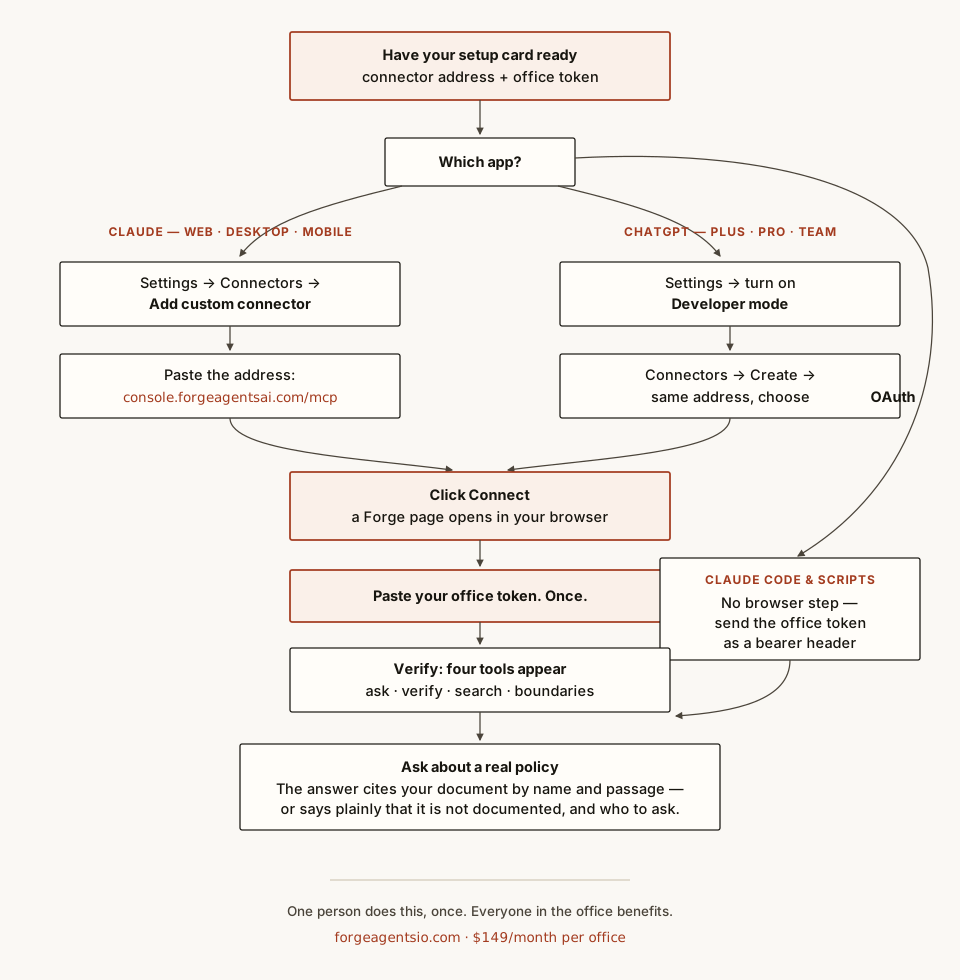
Connected in five steps.
- Open the connector settings. Claude (web, desktop, or phone): Settings → Connectors → Add custom connector. ChatGPT (Plus, Pro, or Team): Settings → enable Developer mode, then Connectors → Create.
- Paste the address: https://console.forgeagentsai.com/mcp
- Click Connect. A Forge page opens — it names the application asking to connect.
- Paste your office token, once. That's the last time anyone sees or types it.
- Verify and ask. Four tools appear. Ask something real — the answer names the exact document and quotes it, or tells you plainly that your documentation doesn't cover it and who to ask instead.
Claude Code and in-house scripts can skip the browser step and use the office token directly as a bearer token on the same address.
Load your own in a few minutes.
On the welcome page, click Load your procedures. Later, go to console.forgeagentsai.com/office/procedures and sign in with your office token. Upload PDF files with selectable text, Word, text or Markdown files, up to 30 files and 25 MB at a time. Each heading starts a procedure, and that heading is the title your answers cite. A scanned PDF has no text to read, so the page skips it and tells you why; upload a Word or text copy instead. A new upload replaces the last one, and your connector answers from it within a minute, with nothing to change in Claude or ChatGPT.
Upload office procedures and policies only, never patient, client or personnel records.
A refusal is the product working.
If the answer is "that's not documented," it means exactly that — nothing was invented to fill the gap. The boundaries tool lists what your documentation explicitly doesn't cover; add the missing document to your files, upload them again, and the answer is there a few minutes later. Lost your token? We rotate you a fresh one in minutes, and the old one stops working the same moment.
Refer an office, earn a fifth of its first year.
If you look after an office's computers, you are the person they trust with "should we use this?" Refer an office to OKA Anywhere and, if they subscribe, you receive 20% of their payments for their first 12 months, paid monthly while they remain a customer. We do the onboarding and the support; there is nothing for you to install or maintain. To register a referral, email daldridge@forgeagentsio.com with the office's name before they subscribe. Customer pricing never changes: $149 a month, flat, whether or not a partner is involved.
Get your office token.
$149 a month per office. No per-question charges.
Subscribe — $149/month Technical docs